What is Clearpay single-use payment?
With Clearpay single-use payment, you can access brands you can’t usually Clearpay directly from the Clearpay app. Simply shop one of our app-exclusive brands, then when you’re ready to checkout, we’ll issue you a one-time card so you can complete your order.
From there, your purchase is just like any other Clearpay order, where you’ll pay it off over 6 weeks, interest-free. And you can view and manage your payments in the My Clearpay tab from in the Clearpay app.
Where can I shop with single-use payment?
Open the Clearpay app and find the Shop tab. Find the section labeled ‘Featured brands’ and click on the black arrow on the right to see the full list of merchants that are available only in the Clearpay app.
We personalise your app experience, so the brands and merchants you see may differ from those shown to other customers. Merchant availability can also depend on your eligibility and shopping preferences, so you may notice certain merchants appear or disappear over time.
Note: single-use payment is not available for subscriptions, if you attempt to make a purchase for a subscription, the order will go through, however subsequent payments will decline as the single-use card expires.
How do I shop with single-use payment?
Open the Clearpay app (make sure you have the latest version).
Explore app-only brands in the 'Featured brands' section in the Shop tab.
Shop, add items to your cart, then when you’re ready to checkout
Select Credit or Debit card, then tap the mint 'Buy Now. Pay Later' button. Confirm your order amount and payment schedule.
Place your order and you’re all set! A one-time card will autofill into the credit/debit card section.
Note: Do NOT set the single-use payment as your default payment method. Setting as default can result in other transactions being charged to the single-use payment, causing your intended order to decline.
How can I shop with Amazon?
To learn more about using single-use payments with Amazon click here
How do I cancel a single-use payment order?
If you’ve entered the purchase amount but haven’t confirmed your payment schedule:
Tap the X in the corner of the Clearpay screen.
The screen will close and this single-use payment setup will stop.
If you’ve confirmed your payment schedule and auto-filled the single-use payment details, but haven’t placed the order:
Tap the Clearpay button at the bottom of the app screen.
Tap ‘Cancel single-use payment’.
The single-use payment details that were auto-filled will be cancelled and can be removed.
If you’ve placed the order:
You’ll need to contact the retailer and request a return. See below, or for more details, read How do returns and refunds work for single-use payment orders?
I auto-filled the single-use payment information but some details are missing. What should I do?
If some single-use payment (like the CVV) is missing from the checkout page, you can retry having the details auto-filled:
Tap the Clearpay button at the bottom of the app screen.
Tap Retry card details.
If you’re experiencing technical difficulties with the single-use payment option, here is a small checklist you can use to try and get it working:
Make sure your phone has the latest software update
Make sure you have the latest version of the Clearpay app
If yes to both of these, try to force close the app and create a new card again
If this still isn't successful, you can get in touch via Help in the app or try again later.
Why was my order declined when I had available funds?
There are a few different reasons as to why your order could be declined, for more details you can read Why is my order being declined?
How do I use single-use payment with store credit, promo codes or redeemed gift cards?
Apply the discount at the store checkout.
Tap the mint ‘Buy now. Pay later’ button.
Enter the full purchase amount (the amount before the discount was applied), plus any shipping and taxes.
Confirm your payment schedule. The single-use payment details will be auto-filled into the credit/debit card section.
Place your order.. We’ll confirm the final discounted price and adjust your payment schedule accordingly.
Please note: You're only charged for what you end up spending, so don't worry if the purchase amount is slightly higher than the order.
If your discount doesn’t appear, cancel the single-use payment order and try again.
I’m trying to purchase but get an error message: We have not detected your cart contents
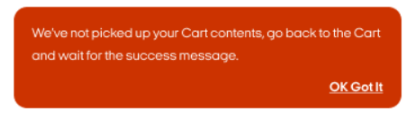
If you see this message when shopping with Clearpay chances are you are moving too fast for our systems to detect your cart.
Here are the steps you should take:
Follow what's written on the error message:
Go back to your cart page
Wait a few seconds - until you get the success page (it's Bondi mint colour)
Proceed to checkout
If this doesn't work, you can also:
Make sure you're using the latest software for your phone
Delete and re-download the Clearpay app to make sure you have the latest version
Logout and log back into the app
Try again
How do returns and refunds work for single-use payment orders?
If your item is eligible for a refund to your original form of payment, follow these steps:
Contact the retailer and start their returns process.
In the orders section of the My Clearpay tab, select the order you wish to return.
Tap the '...' menu button, then select "Returning an order".
Select “Returning by mail”.
Follow the remaining steps.
If you have a question or a concern regarding your refund, you can contact us via the app, please make sure to include a copy of your refund receipt or proof of refund.